Important Programs with Math Functions and Operators in C Programming
This blog is on important programs related to Math Functions and operators in C. Very important programs for College and placement exams.
C PROGRAMMINGPROGRAMMINGMATERIALS FOR C PROGRAMMING
12/9/20253 min read


C Programming - one of the most powerful programming language - is used for solving mathematical and logical problems.Be it be Complex calculations or Simple arithmetic - C provides a wide range of operators and math functions which helps us in writing efficient programs.
Understanding Math Functions in C
We have math.h header file. This file contains several methods/functions which helps us to perform mathematical operations.
To use them, we have to simply include this line at the top of the program: #include<math.h>
Some methods from math.h:


Arithmetic and Logical Operators in C
Operators are special symbols. They have special meaning to the compiler.They tell the compiler to perform specific mathematical or logical operations.
Arithmetic Operators : helps to perform basic arithmetic operations.
Addition Operator : It does Addition. For ex - int result = a + b; // if a=7, b=10 , then result =17
Subtraction Operator: It performs substraction. For ex - int result = a - b; // if a=90, b=89 then result = 1
Multiplication Operator: It performs multiplication. For ex - int product = a * b; //if a=12, b=11 then product =132
Division Operator:This operator (/) divides and gives quotient. For ex - int quo = a/b; // if a = 10, b=2, then quo will be 5.
Modulus Operator: it gives remainder after division, take this example - int rem = a%b; //if a=12, b=5 then rem = 2
Relational Operators: Used to find relation or compare two values.
Consideration => a =10, b=20 for the below explanations.
== [equal to] : checks equality among two values / [operands] . For ex - a==b will return false , as a is not equal to b
!= [ not equal to]: checks whether 2 operands are not equal. For ex - a!=b will return true, as a is actually not equal to b [refer the above consideration]
<= [smaller than equal to] : checks whether left operand is smaller than or equal to the right operand. Lets see this example => a<=b
This will return true as a=10 which is less than b , which is 20.
>= [greater than equal to]: checks whether left operand is greater than or equal to the right operand. Lets see this example => b>=a
This will return true as b=20 which is greater than a , which is 10.
> , < [ greater than , less than ] : These operators check left operand is greater than(>) or less than (<) the right operand respectively.
Example:
a>b ==> will result to false
a<b ==> will result to true
a>=10 ==> will result to true
Also read this resource on Important Programs on Decision Making Statements
I guess now you have got the basics of operators cleared. Lets see some important programs.
Finding Roots of a Quadratic Equation Using Sridharacharya’s Formula
Input a,b,c coefficients of a Quadratic Equation. And find the roots of the equation using Sridharacharya's Formula. [ You can run Programs on Programiz online compiler]


Program to Calculate Compound Interest
Input principal , rate, time and calculate Compound Interest.
Amount = P×(1+100/R)^T
CI = Amount - P
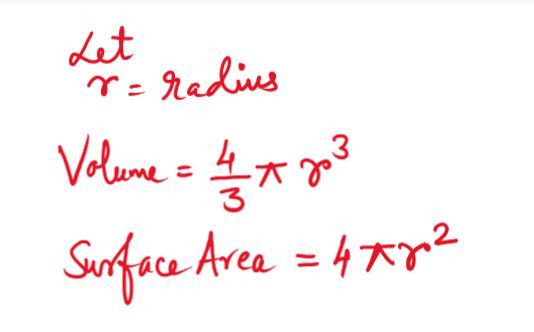
Program to Find Volume and Surface Area of a Sphere - Input radius of a sphere and find the volume and surface area of the sphere. [ You can run the code n Codechef online compiler]
Check Whether a Triangle is Right Angled or Not - Input 3 sides of a triangle and check whether it is Right Angled Triangle or not.
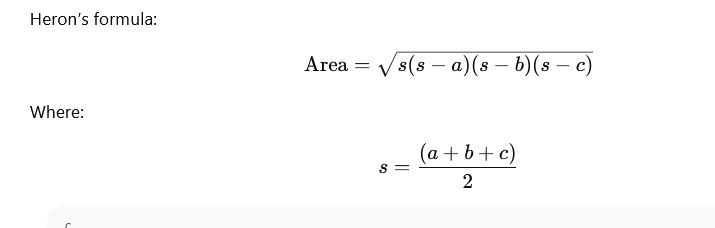
Find the Area of a Triangle Using Heron’s Formula - Input 3 sides of a triangle and find the area of the Triangle using Heron's Formula.